BigQuery alerts: how to stop data issues from ruining your holiday

Imagine the following scenario: Warm weather. A holiday. Fresh air. Rest.
And now imagine a second scenario:
Warm weather. Work. Air conditioning. Numbers swirling in your head. The data in BigQuery doesn't match the ad platforms. Campaign conversions are missing. Reports are full of zeros. Nobody knows what went wrong.
The only analyst who understands the system is the person in the first scenario. You are the one sweating. Instead of relaxing, you are asking yourself: Did an import fail? Did we lose data? Is a metric missing?
A well-configured alert can save you from this unpleasant situation. A simple notification tells you not only that something went wrong, but exactly what happened: "Keboola import failed," or "Error refreshing Facebook token."
What alerting is and why you should care
Alerting watches your data and notifies you when something unexpected happens. Put simply, when a problem appears, you want to know right away, not a week later. An alert can catch missing data, a slowdown in website loading, or an import error before the resulting discrepancies reach your reports.
Analysts and data engineers should treat alerting as basic operational hygiene. It helps them detect outages and errors faster. It also ensures that, when they are away, the rest of the team gets clear, immediate information about where the problem occurred. Alerts protect data, prevent crises, and keep operations running.
With alerting in place, marketing and analytics teams do not have to rely on regular manual checks. They can use reports with confidence while a watchdog automatically growls whenever something unusual happens.
The main benefits of alerting
- Saves time: instead of checking data manually, notifications are sent automatically.
- Speeds up response: early intervention can prevent greater damage.
- Builds trust in the data: teams don't have to worry that something important will slip through.
- Keeps you proactive: instead of waiting for a problem to surface, you catch it as it emerges.
What types of alerts BigQuery supports
Google BigQuery offers several ways to set up alerting. Most alerts can be configured fairly easily, ideally in cooperation with an analyst.
1. Metric alerts
These alerts monitor the volume, threshold, or change in a given value. They work like sensors, checking whether the data remains within expected limits and raising a warning when it does not. You can configure metric alerts for specific numeric values that the system receives regularly.
For example:
- How long a Cloud Function took to run
- A delay in loading a web page
2. Log alerts
Log alerts focus on log messages. BigQuery logs track operations such as who ran a query, whether an import ran, and whether an error occurred. If a data import from an ad platform fails, for example, a specific message appears in the log and an alert can notify you immediately. These alerts identify technical problems before they show up in business metrics.
You can set a log alert, for example:
- If an error occurs while reading data from an API
- If a specific type of error repeats
3. SQL alerts
This type of alert runs SQL queries on a regular schedule to check specific business or technical metrics. If a predefined condition is met—for example, if error messages appear in 25% of logs over two days—the system automatically sends a notification. SQL alerts are flexible because they let you define exactly what counts as a problem. They are also easy to adapt as your needs change, making them ideal for teams that want detailed control over their data.
SQL alerts can also guard data consistency and formatting. You can set rules to check whether fields match the expected type or format, such as whether a product ID contains exactly 6 characters. If a different format starts appearing, the alert tells you so you can resolve the issue quickly. Keep in mind, though, that this check runs only after the data has been loaded into BigQuery. SQL alerts therefore cannot catch errors earlier in the pipeline.
Examples of SQL alerts:
- The number of WARNING logs in the last hour is greater than 50
- An unusual number of failed logins
How alerts work in practice
The basic process is simple:
- Choose the condition you want to monitor (e.g. a threshold for a value, an error in a log).
- Set the check frequency (e.g. every day).
- Choose a communication channel for the notification.
You can connect alerts to tools your company already uses. It is also a good idea to categorize alerts by severity:
- Critical alerts: for example, an import outage or the failure of a key API. Send these through an urgent channel so you notice them immediately.
- Medium-priority alerts: for example, a technical error that does not block operations but still requires intervention. These can automatically create a ticket or task in Asana or another system.
- Informational alerts: for example, a change in data volume or a slight deviation in a metric. These can go to Slack or an email digest.
Possible communication channels:
- Slack: the alert arrives directly in a designated channel
- Email: a summary message or a notification to an individual
- Webhook: the alert triggers an automatic action, e.g. creating a task in Asana or Trello
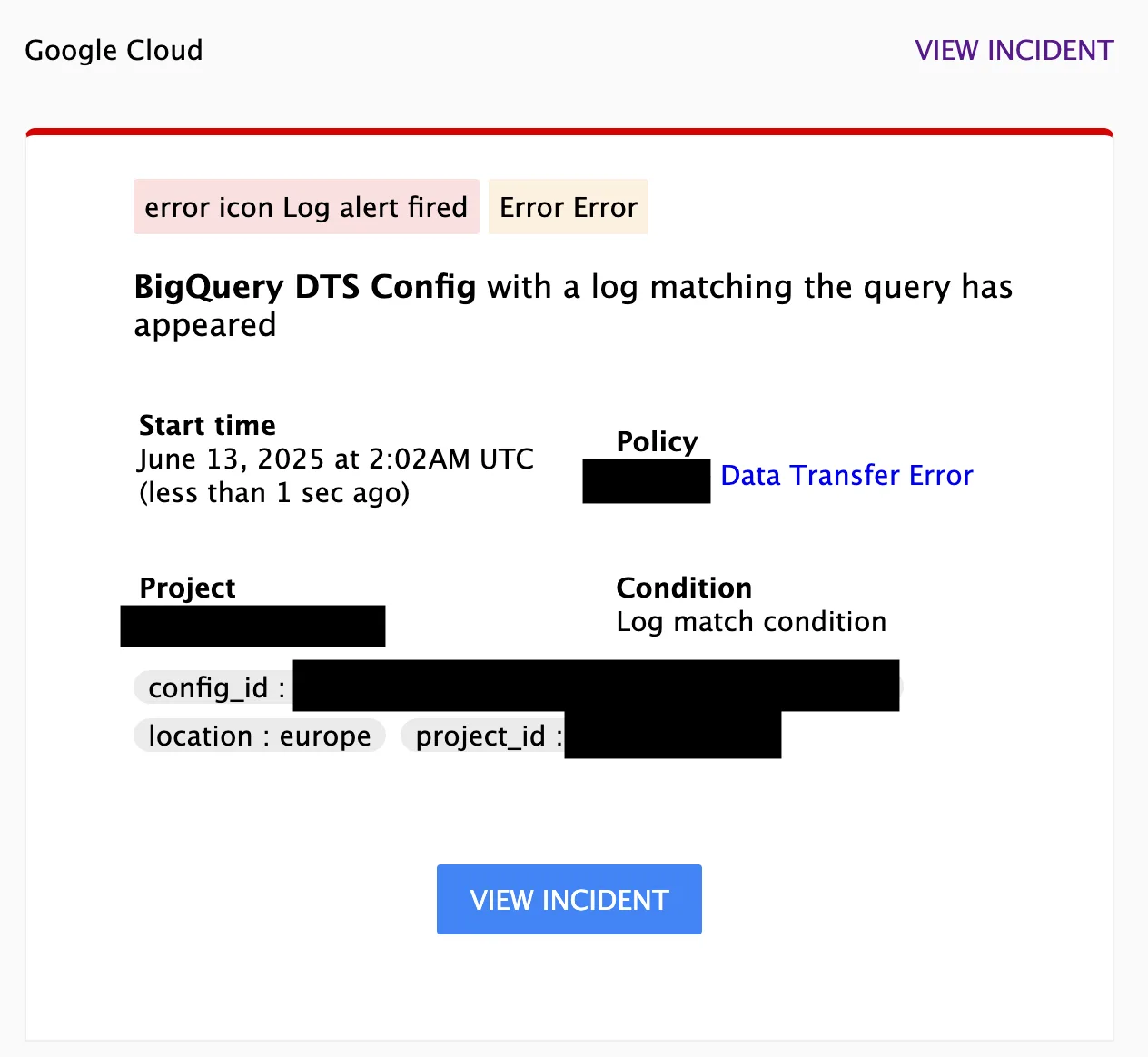
An example of an alert email.
An e-commerce use case
Imagine an online store that closely tracks its marketing campaigns every day. To ensure its decisions rest on complete, accurate data, it has set up alerts to check whether every important source has loaded. This matters especially when sales and cost data come from different systems and must then be compared.
Then one day, a notification arrives: "Facebook import failed." Conversion data from an external ad platform has not loaded. Thanks to the alert, the analyst responds immediately, checks the data pipeline, and discovers that authentication failed during the API call. They renew the authentication, and within an hour everything is back to normal. The marketing team can continue using its reports with confidence.
Without the alert, the team might not have noticed the error for several days. By then it would have compromised every downstream analysis and delayed marketing budget planning for the latest campaign. Even one well-configured alert can make the whole business run more smoothly.
Remember the recent Reebok case, when euro prices appeared on the Czech online store without being converted. Sneakers priced at 80 euros were listed at 80 Czech koruna (CZK). The error remained live for two days before someone noticed and restored the correct prices.
Monitoring average order value could catch a situation like that. If the average suddenly fell by more than 50% compared with previous days, an alert could automatically warn the team of a possible pricing error or other anomaly.
Why start with alerting
Companies that rely on data should invest in its quality and oversight as well as in collecting and visualizing it. Alerting is a simple but extremely effective tool. It helps companies respond quickly, protect revenue, and build specialists' trust in analytics systems.
You do not need an army of data scientists or a complex system. Start small, perhaps with a single alert that checks the daily import.
The sooner you start, the more confident you can be that your decisions rest on solid data that will not let you down at a critical moment.
For more advanced scenarios, you can extend alerting with Cloud Functions and Pub/Sub. This is more technically demanding, but it offers a high degree of flexibility. You can track custom metrics, respond to specific events, and connect alerts to other systems in real time. It is ideal for teams with more complex requirements—but that is a topic for another time.
Anomaly detection deserves a separate discussion. Rather than using predefined conditions, it employs statistical models or machine learning to watch for unusual behavior in the data. It can uncover problems we did not anticipate when setting up alerts, including unexpected trends or fluctuations that conventional alerts would miss.
If you do not have alerting yet, talk to your analytics team and identify the most critical areas where it would help. Start with one alert that checks a daily import, then extend coverage as the team learns which failures matter most. That way, everyone can enjoy a peaceful holiday.
This article was translated from the Czech original on the igloonet blog.