Data alerts and AI agents: why validation still matters
On Thursday, April 9, we held the 10th Penguin Webinar, igloonet's educational webinar series. Adam and Michaela covered alerting, a field that has always mattered and is becoming even more important with the rapid rise of AI agents. Whether you're experimenting with agents or still watching from a distance, keep reading. You could save time, money, and stress. We'll explain what alerting is, how it differs from dashboards, why it matters when deploying AI agents, and what technology sits behind it.
Do we need alerting? Isn't a dashboard enough?
What is alerting, exactly? As the name suggests, it is a notification: a signal meant to catch our attention. When an alert arrives, we should perk up because something has happened that needs our attention.
Alerts fall into several categories. System alerts flag data errors or failed connectors. Web alerts flag measurement outages, misfiring GTM setups, or JavaScript errors. We won't explore this technical alerting further here, but it forms the foundation of the whole process. If the incoming data isn't sound, any alerting built on top of it is pointless.
This article focuses on data alerts. We already have reliable data, and we want to be notified of deviations and problems—as well as opportunities we might miss while browsing a dashboard in the usual way.
Here's an example:
Imagine you're a PPC specialist managing dozens or hundreds of campaigns across several markets. You arrive at work, open a huge dashboard containing every campaign, and start looking for what you could improve, switch off, or boost. But there are so many campaigns and metrics that information overload sets in. You're buried in data to the point that sound decisions become difficult. You work slowly and inefficiently, with no time left for development because this exploration “eats” most of your day.
This is where alerting comes in. Instead of combing through a huge dashboard every morning, you check your email, Slack, Asana, or another system. A message is waiting with the campaigns that truly deserve your attention.
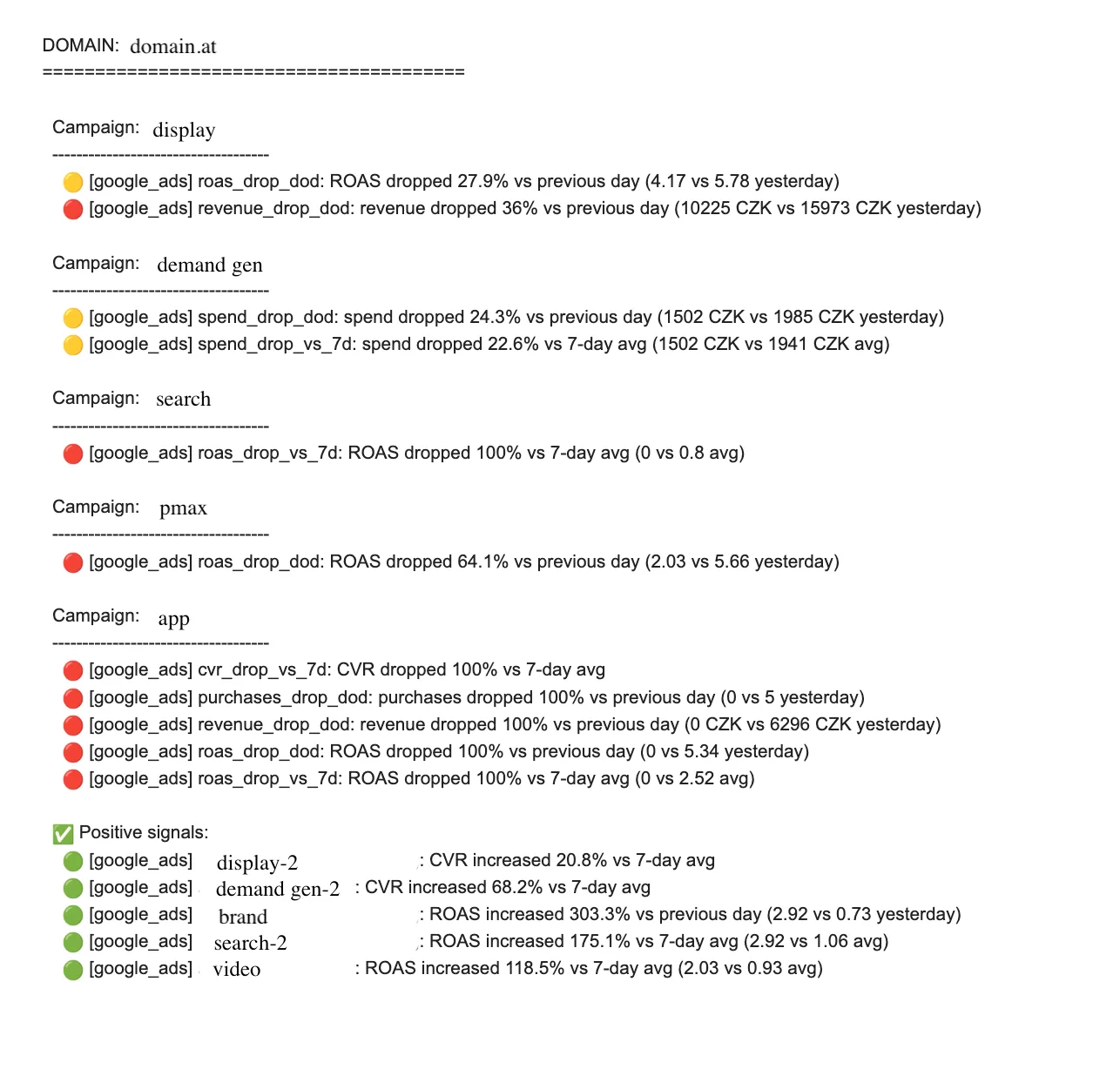
An example of what a notification email can look like.
As a specialist, you immediately know what needs attention. The system does the boring, monotonous work, leaving you free to tackle the specific problem. And yes, now you can open the dashboard, where all the necessary data is waiting. But you are no longer wading through hundreds of campaigns; you can focus on the handful that actually need work.
This doesn't have to be limited to campaigns and specialists. We can also send less frequent, higher-level summaries to team leads, executives, and business owners, with enough aggregation to support their decisions.
The format is highly customizable. We can alert on practically anything, in almost any way. Alerts can be segmented so that each department receives a different notification, in a different format and according to different rules. Even individual employees can receive different alerts at different frequencies based on their roles and needs.
Another advantage of alerting is dynamic thresholds. Dashboards usually have conditional formatting along the lines of, _“When a campaign's ROAS drops below X, the row turns red.”_ With alerting and access to the entire data warehouse, we can model these values dynamically, either with sophisticated methods such as statistical models or simple ones such as moving averages.
💡 Set thresholds carefully. You don't want an alert for a campaign that produced two conversions today compared with four yesterday. Campaigns like that will always exist, but they don't need to trigger either positive or negative alerts.
Dynamic thresholds add a great deal of value, but we shouldn't turn our backs on static ones. They are useful when budgets are fixed and a campaign—or all campaigns combined—must not exceed them under any circumstances. They also help when the business has limited capacity and an extremely successful campaign could create more demand than it can meet. Consider a chain of hair salons, where capacity is inherently limited. A promotion that succeeds too well could backfire: longer waiting times might damage the chain's reputation. Potential customers may see the ad but decide not to book because of the wait, ultimately hurting the campaign's results.
Adam and Michaela gave another example in the webinar, one in which alerting can save both money and reputation. You run an online sneaker store. Out of nowhere, sales multiply, but revenue mysteriously drops even as you register a record number of orders. Every alert you have should go off, with maximum-priority SMS messages arriving immediately. What happened in reality? It took several days to find the problem, by which point the damage was done.
Alerting in the context of AI agents
Some of you may be thinking you already have this covered because an AI agent automatically does exactly what I described above. That's a fair point. But you need to understand how these agents work and why their outputs and recommendations still need validation.
Alerting is purely deterministic. It follows clearly defined code and rules, producing consistent and predictable outputs. An AI agent, by contrast, is nondeterministic: it still operates on probabilities. AI has advanced at breakneck speed in recent months and years, but the underlying principle remains the same. Outputs can be inconsistent, and the agent can hallucinate or lose context.

Context is another sore spot for AI agents. If we have hundreds of campaigns with dozens of metrics, letting an agent loose on the entire dataset will be expensive and inefficient. The alert itself—the notification we receive—is only the final step, and the data must first be filtered. Instead of connecting the agent to the whole dataset, we give it only the subset selected deterministically. This significantly reduces the context it needs, saves money, and gives us confidence that it is working only on campaigns that require attention.
The context problem is especially noticeable when a data warehouse hasn't been prepared for AI agents. Above all, that means having a well-built semantic layer, which is essential for agents to work correctly. If we don't have one, precomputed tables can serve as a shared source for both alerts and agents.
Finally, there is validation itself. If you deploy AI agents, you have to verify that they aren't lying to you or hallucinating. Did the agent choose the right campaigns? Did it calculate ROAS correctly? Has it misunderstood how to make a YoY comparison? Comparing the alerting output with the agent's output makes errors easier to spot.
If you take one thing away from this article, let it be this: alerting is a clearly defined, deterministic safeguard for something that can be unstable.
Anomaly detection
Alerting is useful precisely because it follows the rules we set. But that clear advantage is also a disadvantage: situations our rules don't define can slip past us. To catch them, we use anomaly detection.
Unlike alerting, anomaly detection isn't governed by fixed rules, such as tracking ROAS against a seven-day moving average. Instead, it looks for data that deviates from normal behavior.
At a basic level, we can use BigQuery ML, the simplest choice when we use the Google stack—which, given our need for BigQuery, we usually do. We can also turn to specialized algorithms such as Prophet, Silverkite, Isolation Forest, or the statistical SARIMA model.
A major advantage of advanced models is how they handle seasonality. With fixed alerting, the system starts to “go crazy” as soon as the season begins, even when we use dynamic thresholds. The same thing happens when the season ends. Algorithms, by contrast, can account for these fluctuations because they recognize patterns in historical data.
Advanced models have pitfalls too, particularly false positives. We therefore recommend deploying them gradually while tuning out events that look anomalous to the model but don't matter to us as specialists because we expect them and don't need an alert. It also makes sense to choose channels by severity: low-priority events can be logged to a file without a notification, medium-priority ones can trigger an email, and highly unusual, critical anomalies can send an SMS.
One last recommendation: don't be afraid to use several algorithms at once. They can cross-check one another and confirm whether something really is an anomaly before notifying the end user.
Technology corner
Some webinar participants were interested in the technology behind alerting, so here is an example of what the workflow can look like.
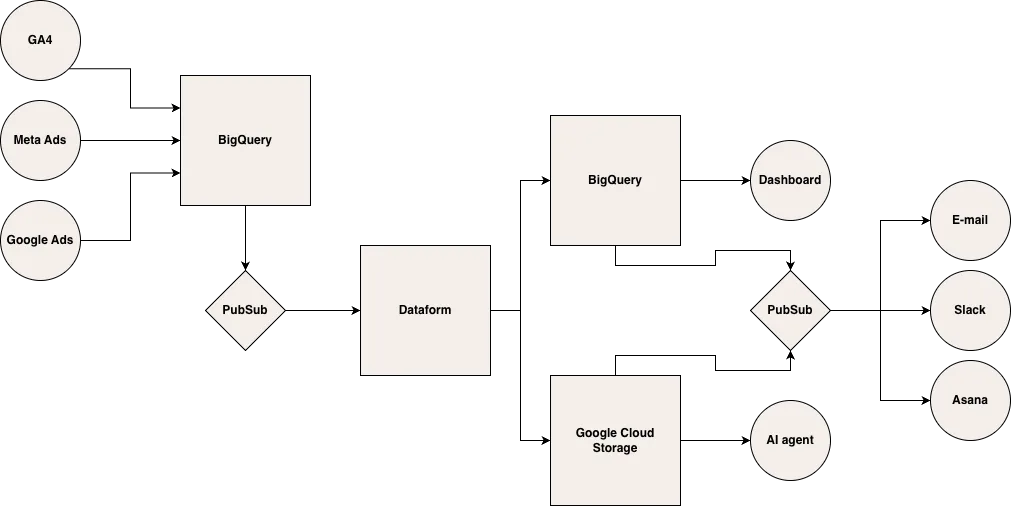
A simplified schematic of a possible workflow.
First, of course, we need data. In this example, connectors load data from GA4, Google Ads, and Meta Ads into BigQuery. Once the data is complete—for the previous day, for example—Pub/Sub triggers Dataform (or dbt), where the data modeling happens.
We store the processed data in BigQuery or Google Cloud Storage. Dashboards usually connect to BigQuery, while the AI agent accesses files in Google Cloud Storage. Once both services are populated, Pub/Sub detects this and sends alerts to the target systems.
Pub/Sub plays an essential role in the workflow because it orchestrates operations only after the data is complete. In theory, we could replace it with a cron job that runs every day at 7:00, but the data might not be complete by then. And complete data is a prerequisite for data alerting to work properly.
This is only a simplified example. For clients using AI agents and alerting, the exact setup varies with their needs and tools. The agent can also be integrated in several ways: it can access structured data in GCS, as in the diagram; the data can be sent to the client's on-premises server; or the agent can access it through MCP.
As Adam also said in the webinar, an individual approach matters: no single solution fits everyone.
How to get started with alerting
We've covered what alerting is, why we might want it, and where it can help. But how do you get started without immediately building a monster?
First, think about the information you need. Does your workday resemble the one I described at the beginning of this article? What signals help you decide what to do with a campaign? Which indicators tell you whether it is successful? If you're an executive, what information do you care about, and how often? Is an employee spending several—or dozens of—hours preparing it for you? Could it be automated?
Define those needs clearly, but keep the list short. The reason is simple: we want to avoid false positives. If an email about potentially problematic campaigns arrives every day and everything turns out to be fine each time, we will eventually ignore it. Alert fatigue is a well-known problem, and we should design against it. Alerts should fire only when there is a real issue.
Once you've written down your needs, you essentially have a set of rules. Those rules then need to be implemented in a system like the one in the diagram above—and we'll be very happy to help you with that.
This article was translated from the Czech original on the igloonet blog.