
Executive reporting vs. marketing reporting: what should be different?

Executives and marketers work with different kinds of data. Leadership tends to rely on accounting data, while marketing uses web and campaign data. The result is dual-track reporting, which has its advantages but also some significant drawbacks. We will look at specific executive and marketing reports and show how to approach data at both levels.
Dual-track reporting
Most companies work with data on two levels. On one side is accounting data: tightly controlled, with a minimal error rate, but usually slower and less flexible as a result.
On the other side is marketing data. It tends to live a life of its own and is generally subject to far less control. The upside is that it is "real-time," and marketers can build their own dashboards on top of it without too many restrictions.
💡 _Real-time usually means a two-day delay for GA4 data because of the daily export to BigQuery. Only with streaming can you work with truly real-time data._
The dual track itself doesn't bother me. Trouble starts when leadership and marketing use the same name for slightly different metrics. Revenue, for example, may be adjusted for cancellations and returns in leadership reports but left unadjusted in marketing reports. That is asking for trouble.
Example reports
The easiest way to show the difference between executive and marketing data is through examples. All the reports here focus exclusively on e-commerce. We did discuss the differences for lead-generation companies in the webinar, but I am afraid including those would make the article too confusing. We will save lead-based businesses for next time.
Basic reports
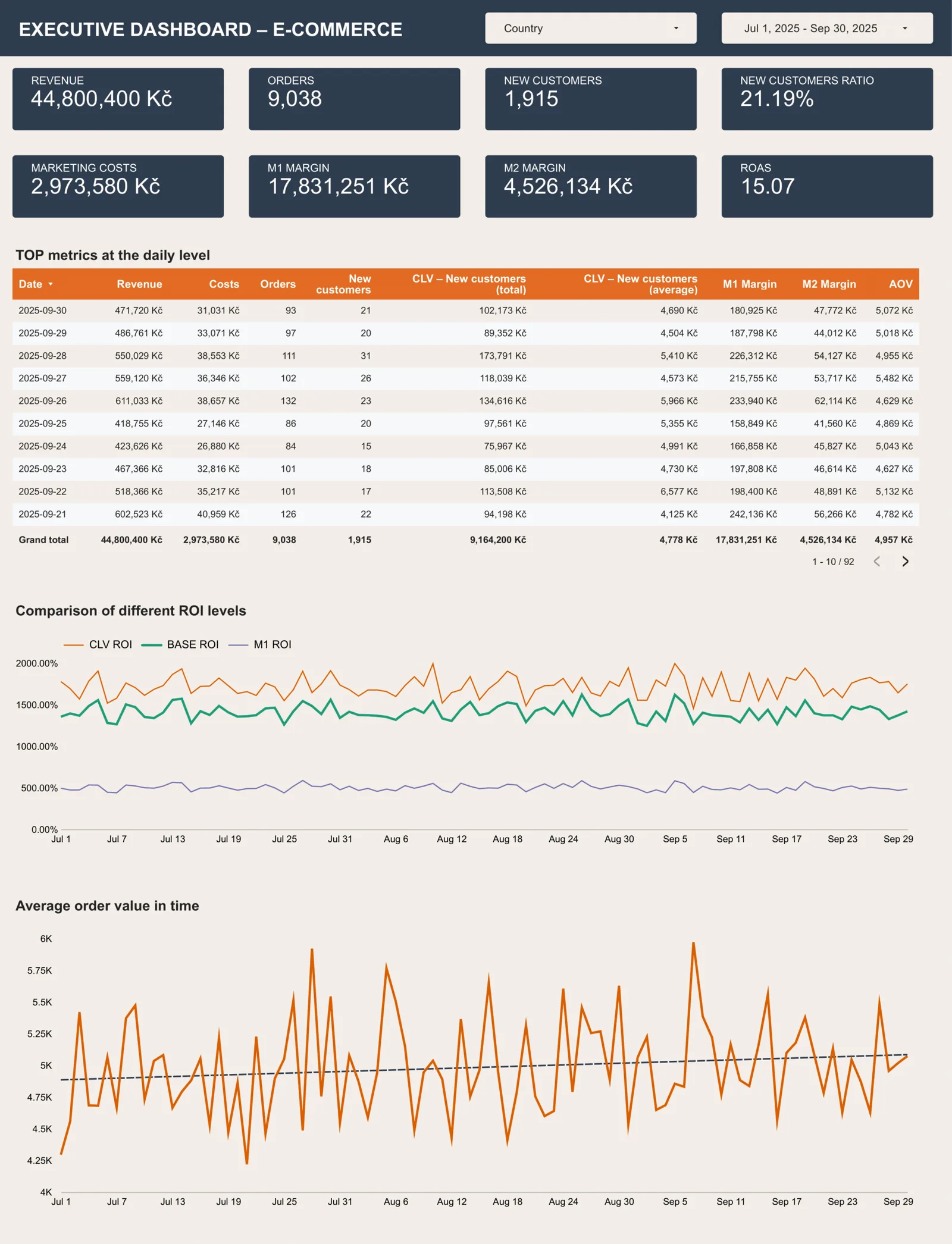
This is the essential big-picture view. A few parts of this report are particularly interesting.
The first is the number of new customers and their long-term value (CLV of new customers). These metrics rarely appear in C-level dashboards. To me, this is an ideal example of bringing marketing theory into executive decision-making. Hardly anyone in marketing would dispute that without acquisition, a company cannot grow in the long run and will gradually start to die. Showing the long-term value of new customers makes that impact clear without a lengthy lesson in marketing theory.
💡 We usually don't work with the entire CLV, but with a one- to three-year outlook (how much a new customer spends with us within one to three years). Read more about CLV in the article from our previous webinar on customer lifetime value.
Another important point is the use of trends. Every report needs context. If we can't show change over time or compare a result with the market or our usual performance, the report is far less informative. Here, we show the long-term development of 3 levels of ROI and overlay average order value with a trend line. Another option would be to compare the current result with both last year's result and the forecast for the period. The drawback is that we suddenly have three numbers instead of one. Apply that comparison to every metric, and the report soon becomes cluttered.
Clarity is essential. We don't want people puzzling over what a report is actually telling them. For every report, we should consider what to remove as well as what to add. We are always looking for the right balance: enough useful information to support a decision without overwhelming the reader.
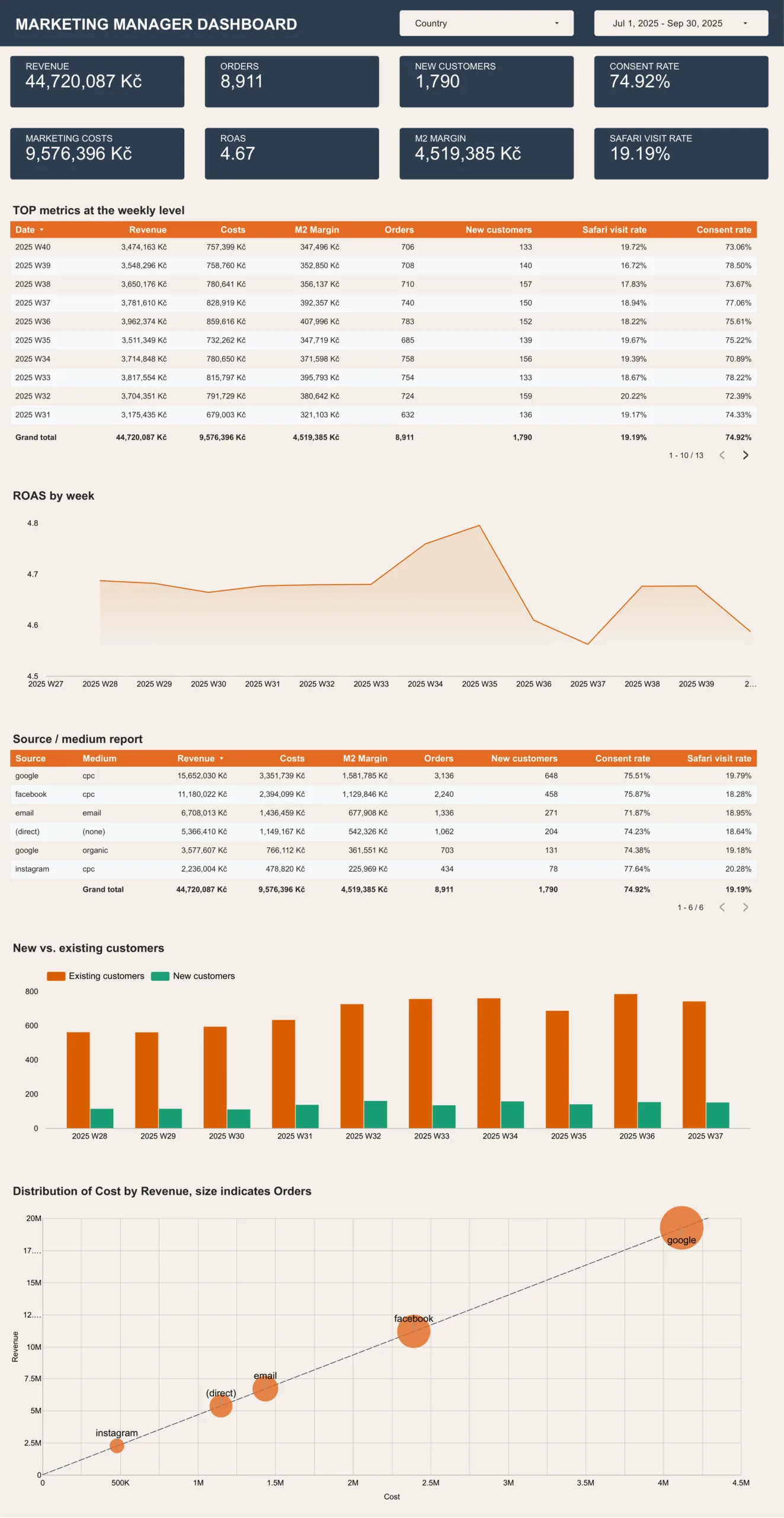
By contrast, a basic dashboard for a marketing manager usually doesn't need two levels of margin and can do without AOV and the CLV of new customers. Weekly granularity will often be more useful than daily figures, while a breakdown of results by channel is essential. You can supplement it with an alternative attribution model or, as in this case, compare the measured results with each source's consent rate and the percentage of its traffic coming from Safari. The marketing manager can then see at a glance how much a given source is likely to be over- or undervalued relative to the whole.
A bubble chart makes channel performance easier to read. It shows both how a channel is doing and how important it is in terms of the orders it brings in. The bigger the bubble, the more attention the marketing manager should give it. A small bubble signals that even a major intervention will have little impact.
Product reports
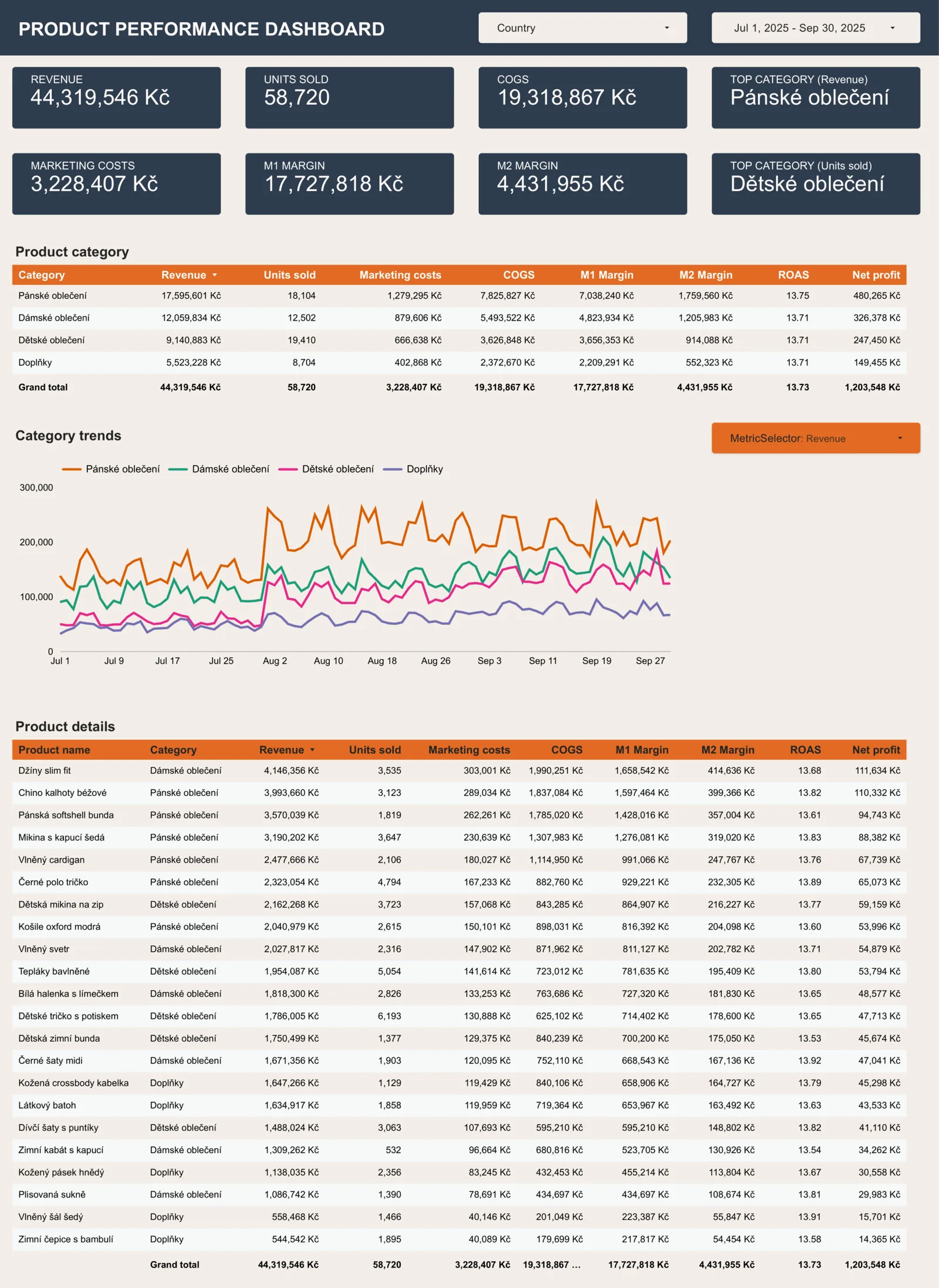
The product report for leadership relies mainly on a category breakdown, with product-level detail added where useful. As with the basic report, it is worth considering comparisons with last year and the forecast. We may not need to know which category sells the most units, but alongside the top category by revenue, we do want to see which one contributes the largest share of margin.
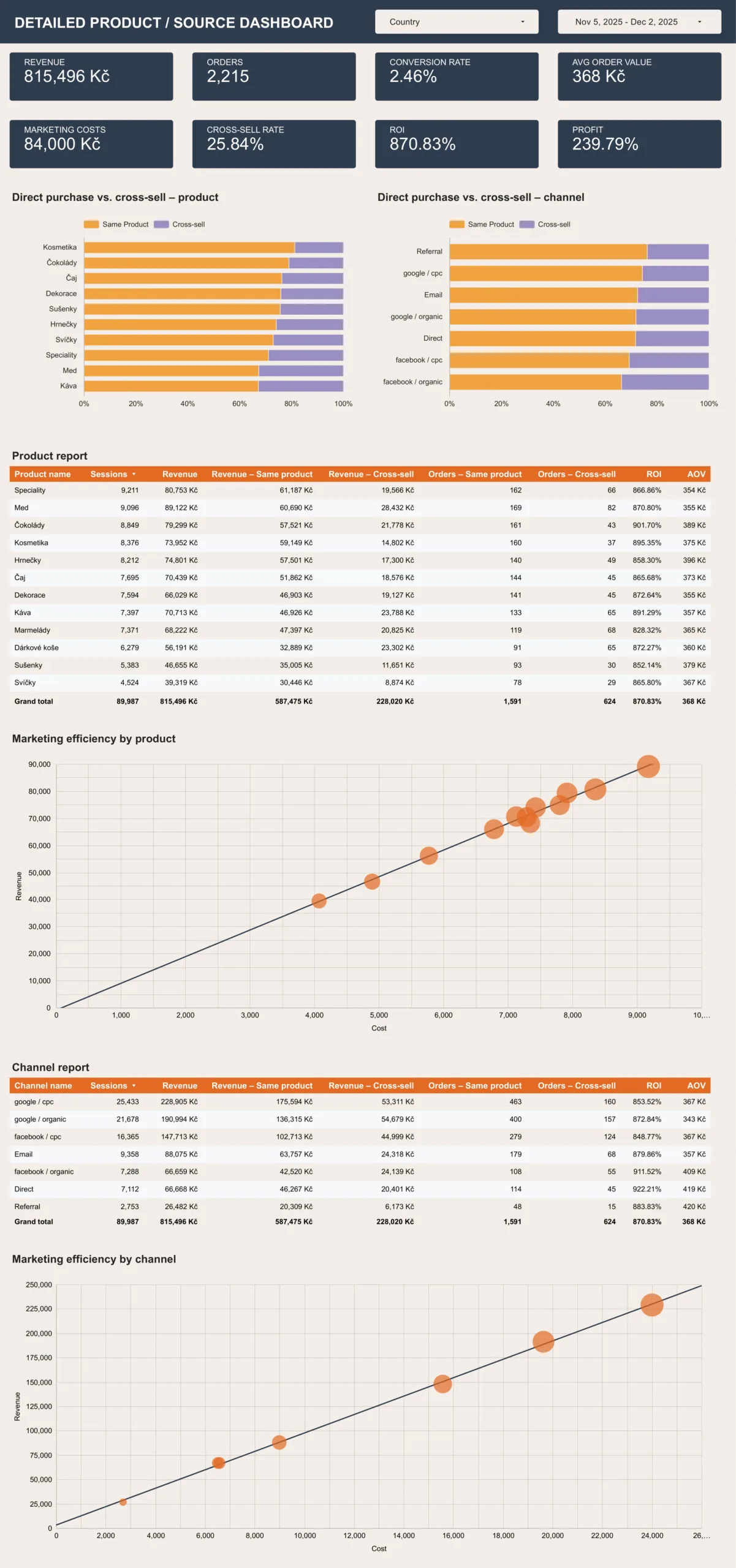
The marketing report goes deeper. It shows how often customers buy the product that brought them to the online store (the landing-page product) and how often they end up buying something else. This reveals products or categories that work well for customer acquisition even though customers don't buy much of the products themselves. Deeper analysis can then uncover why and whether a different entry-point product could deliver even better results.
I find the at-a-glance comparison of landing-page product purchases with other product purchases particularly useful, both by category and by channel. We could take the report further by comparing product or category sales across channels. This view can reveal gaps in how particular products are promoted, giving us opportunities to act.
This product-level view of marketing efficiency only suits companies with a small product range. For most online stores, it is more useful at the category level. Again, the bubble chart lets the marketing manager see at a glance both the efficiency of investment in each category and its share of revenue.
The discount spiral and promotions reports
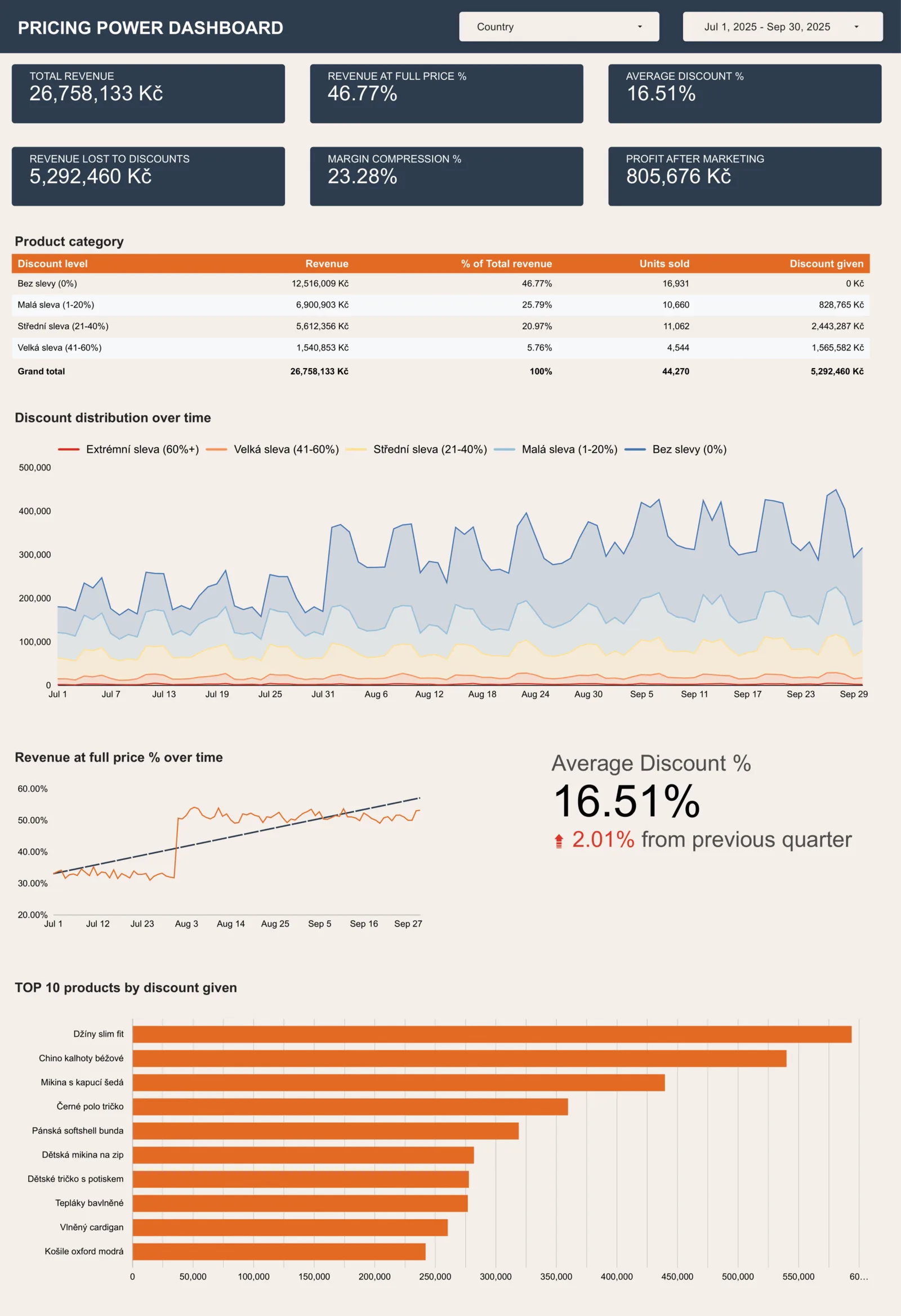
Few reports show so clearly how dependent a company is on discounts and how customer sensitivity to them changes over time. The main breakdown shows what share of products sold at each discount level, how willing customers are to pay full price, and the average discount.
A breakdown of the most heavily discounted products then serves as a stepping stone to the promotions report.
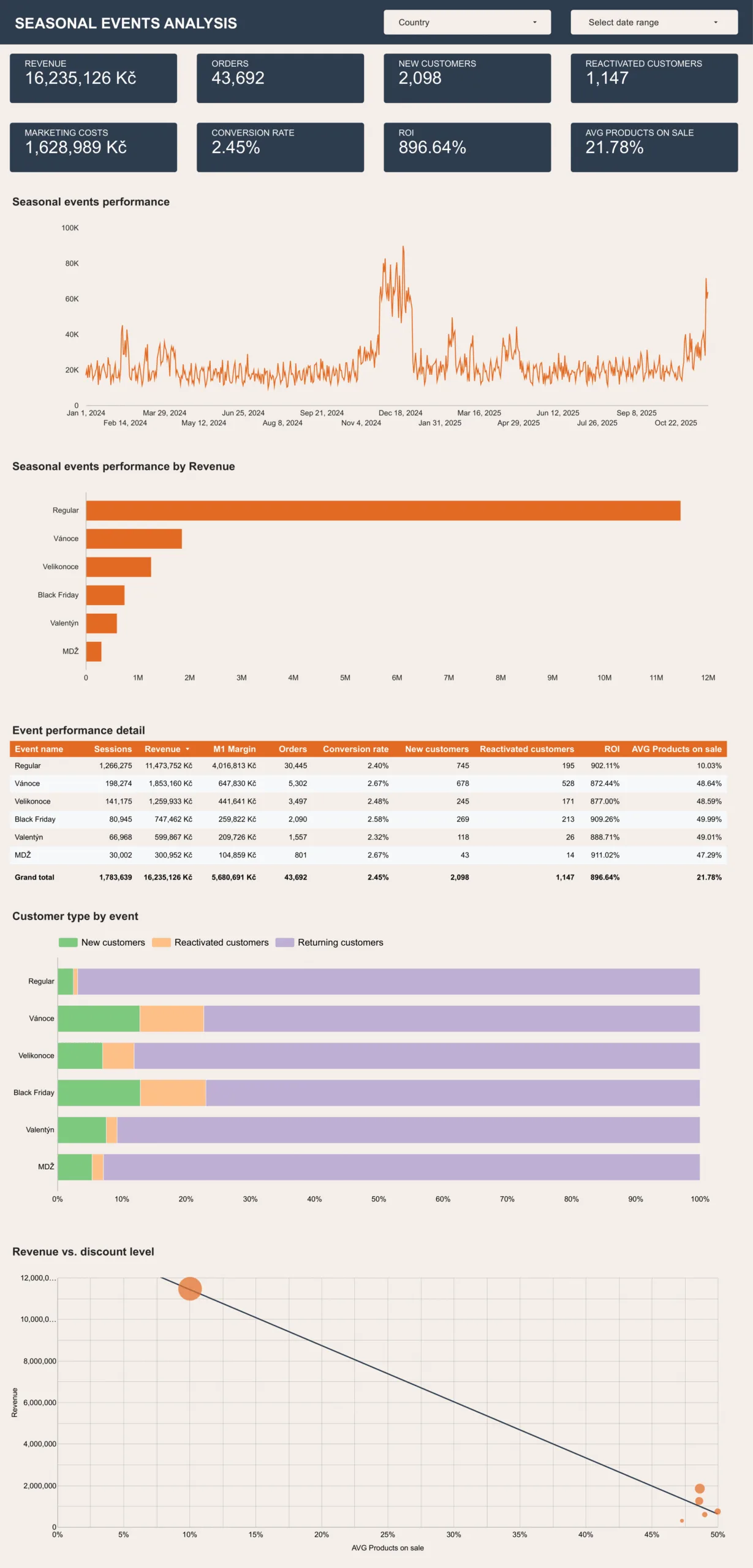
The promotions report shows how much of our sales come from promotions and how the latest one performed in the context of the others. That may be enough for a big-picture overview, but in most cases I would add the duration of each promotion. Even if you think you will only ever run week-long promotions, I recommend including the duration anyway.
Why people don't work with data
People don't work with data as much as companies would like. If I had to name the most common problem we encounter in companies, this would be it.
From behind our desks, we could blame the people who don't use the data and say that, in the worst case, we will simply replace the team. But the problem usually runs deeper, and changing the team won't solve it.
People won't work much with data if:
- they don't trust it because definitions, quality, or gaps in the data are unclear (data skepticism),
- the data is scattered across too many places, and simply bringing it together takes up much of their day (data fragmentation),
- the data is all in one place but contains so much detail that making sense of it takes enormous mental effort (information overload),
- they do have data, but only the data that is easy to obtain; that can create the illusion of availability while the data they actually need for their work is missing,
- the data arrives so late that it is no longer relevant (staleness).
Each of these problems can be solved, some more easily than others. But unless we understand the main reasons people aren't using data, any effort we put into building a data-driven culture will have little effect.
General recommendations
There is no single ideal dashboard for everyone. Every company has its own needs and should focus on different details in its reporting.
Think about how you would adapt each of the reports shown here to make it as useful as possible for your own business.
Every report should start with the business goal. Don't be tempted to report simple metrics just because you don't know how to display what you actually need.
A good report goes through an initial design process and then further tuning. However carefully you think it through in advance, you should rarely settle for the first version. Once you start using it every day, you will gradually discover what needs to change.
For important initiatives, it makes sense to create a more detailed view—for example, to track a new collection, a newly listed supplier, or an entry into a new market.
If you create reports, pay attention to how people use them. Most tools provide at least basic usage data for each report. If nobody has touched one in a long time, find out why—or archive it ruthlessly. The more active reports you have, the harder it is to keep them up to date and the greater the risk of overwhelming the people who are supposed to use them.
In the webinar, we also discussed how data doesn't always need to come in the form of a report. Automated alerts or anomaly detection are often far more effective. It is also important to distinguish alerts by severity. If the same-looking notification arrives every day, you will soon start ignoring it. But if critical alerts (which happen once a month) arrive by SMS, missing data automatically creates an Asana ticket, and a regular overview appears in Slack every morning, the system will probably work much better.
We also covered the basics of the data stack—how to turn raw data into reports like these—and how to apply a dual-track approach at that level. For a related practical perspective, revisit our article on customer lifetime value.
This article was translated from the Czech original on the igloonet blog.