
How to get data into BigQuery

BigQuery is one of the most important tools in digital analytics today. It lets you efficiently process large volumes of data, bring them together in one place, standardize them, and work with them regardless of their source. As data volumes grow and maintaining quality becomes more challenging, so does the need for a reliable, flexible data warehouse. BigQuery also benefits from tight integration with other Google services. You can easily connect data from Google Analytics 4, Google Ads, Search Console, or Google Play. But the possibilities don't end there: BigQuery isn't limited to official connectors. There are many ways to get data in and just as many ways to export it again. This article focuses on the first part, covering practical methods for loading data into BigQuery, from the simplest options to those used in larger, more complex data ecosystems.
Why store data in BigQuery
BigQuery is a natural choice for digital analytics, largely because of how it works with GA4 data. Its native integration provides an event-level stream, giving us much more detail than the GA4 interface. Instead of aggregated metrics, we get an exported history of individual events, including parameters the UI doesn't show at all. The GA4 interface is useful for quick overviews, but it relies on preprocessed data, changes some metric definitions, and has limitations that make deeper analysis difficult. For analyzing recorded user journeys, auditing measurement, checking attribution models, or applying our own calculation logic, BigQuery offers more flexibility, although collection gaps and consent restrictions still affect the data available.
Another essential benefit of a unified data warehouse is the simple fact that all the data is in one place. It sounds trivial, but it becomes critical as the number of sources grows. Consider a common scenario.
Imagine an online store that uses GA4; several ad systems, including Google Ads, Facebook, Sklik (a Czech search advertising platform), Bing, and Pinterest; and an internal system for orders and accounting. Without a data warehouse, its data is scattered across separate platforms. That makes comparisons difficult, slows down debugging, and practically rules out consistent reporting across sources.
Yes, some sources can connect directly to Looker Studio. GA4 and Google Ads work without a problem. For other platforms, however, we depend on external connectors or scripts that push data into Google Sheets. Internal data often can't be added to the visualization tool at all, or only with considerable effort.
Such a workflow has several weaknesses:
- It is expensive: connectors cost money and often charge by data volume, user, or ad account.
- It is fragmented: each source connects and behaves differently.
- It offers no robust transformations: we either skip most adjustments or “glue” them together directly in Looker, leaving plenty of room for error.
When the numbers don't match, the long search for the problem begins. We check visualizations, Looker Studio transformations, connector behavior, API limits, and the source data itself—which is scattered across different systems. Centralizing data in BigQuery is exactly what resolves this chaos.
BigQuery's place in the wider Google Cloud Platform ecosystem is another major advantage. It gives us a range of services that connect naturally with one another. Whether we need to fetch and transform data, schedule pipelines, build reports, monitor quality, or add models and automations, GCP offers tools that work with BigQuery without unnecessary friction.
What you can load into BigQuery
BigQuery can work with almost any type of data, so we can centralize most of what appears in a typical marketing or e-commerce ecosystem. We have already mentioned GA4, one of the main reasons we use BigQuery, but the possibilities extend much further. We can load data from a range of Google services as well as external platforms. Integration is simple for some systems and more complex for others, depending on the API—or whether one exists at all—and the access the client gives us. Most integrations either connect two databases, such as an internal database and BigQuery, or download data exposed through an API.
BigQuery isn't only for “live” data sources. We can also use it to consolidate supporting data, such as exchange rates, and historical datasets previously stored in places like Google Sheets. This means we don't have to start from scratch: if the history is available, we can bring over practically all of it. That is especially useful for systems where downloading older data is limited or entirely impossible.
When discussing historical data, we need to mention connecting GA4 to BigQuery. This step is often forgotten, with consequences that are unfortunately irreversible: you cannot export historical GA4 data to BigQuery retroactively. The export starts only when you enable the integration, creating daily tables of event-level data from that point forward. If you plan to work with detailed historical data, connect the two as soon as possible. Standard GA4 properties can export up to one million events per day through the daily BigQuery export. This is an export limit, not a free-ingestion threshold. The daily export itself is free, but BigQuery storage and query processing may incur charges. Streaming export has additional costs. See Google's export documentation and BigQuery pricing. Historical Google Search Console data presents a similar issue.
Our own databases, on the other hand, can be loaded retroactively, depending mainly on how long the client retains the data. We can also retrieve historical data from ad systems. The details vary, but you can generally work with several years of data. Expect the transfer to take time: loading 300 days of Google Ads data, for example, takes about a week. Facebook can limit access to historical product data. We can retrieve it only by generating and downloading reports, which puts a heavy load on the API and means the transfer must proceed very slowly.
How to get data into BigQuery
Now we know why we use BigQuery and the wide range of data it can hold. One step remains: how do we get the data there? We have many options, starting with the simplest ones, which can be configured directly in the individual tools without writing any code.
First is GA4, which we have already mentioned. You configure the integration directly in the interface, and setup takes only a few minutes. All you need is an existing GCP project with billing enabled. The BigQuery sandbox has limitations, including automatic table expiration after 60 days; enable billing and review the expiration settings for production use.
The Google Search Console connection works on the same principle. Here too, the tool sends data directly to BigQuery, and the export begins only when you enable the integration. In return, you get much more detailed, analysis-ready data than the GSC interface provides, especially for queries and URLs.
💡 For the transfer from Search Console to work, you need a service account in GCP with the _BigQuery Job User_ and _BigQuery Data Editor_ roles.
BigQuery Data Transfer Service
Let's stay with Google services a little longer and look at an especially useful BigQuery option: BigQuery Data Transfer Service. This GCP integration tool automatically transfers data from selected services into BigQuery without requiring custom code. Here, the advantage of BigQuery's place in a wider cloud ecosystem becomes fully apparent.
One of the most common connections is Google Ads, and the integration is straightforward. In GCP, we select Data Transfer and enter the Customer ID; the daily data export then starts automatically. The result is a large set of tables, usually around 120, that we can transform, analyze, or join with other sources. Google recently added the option to write a custom query while creating the transfer and save aggregated data directly to the resulting table. This can save space, but it carries a risk: if we later need metrics or dimensions omitted from the original query, we have to set up the entire process again. In practice, it is therefore often better to download the complete dataset and decide how to use it later in BigQuery.
BigQuery Data Transfer Service also connects to other platforms. Alongside Google Ads and other Google services, it supports external systems such as Stripe, PayPal, and Facebook. Facebook deserves a closer look because it neatly illustrates both the advantages and the limits of native connectors.
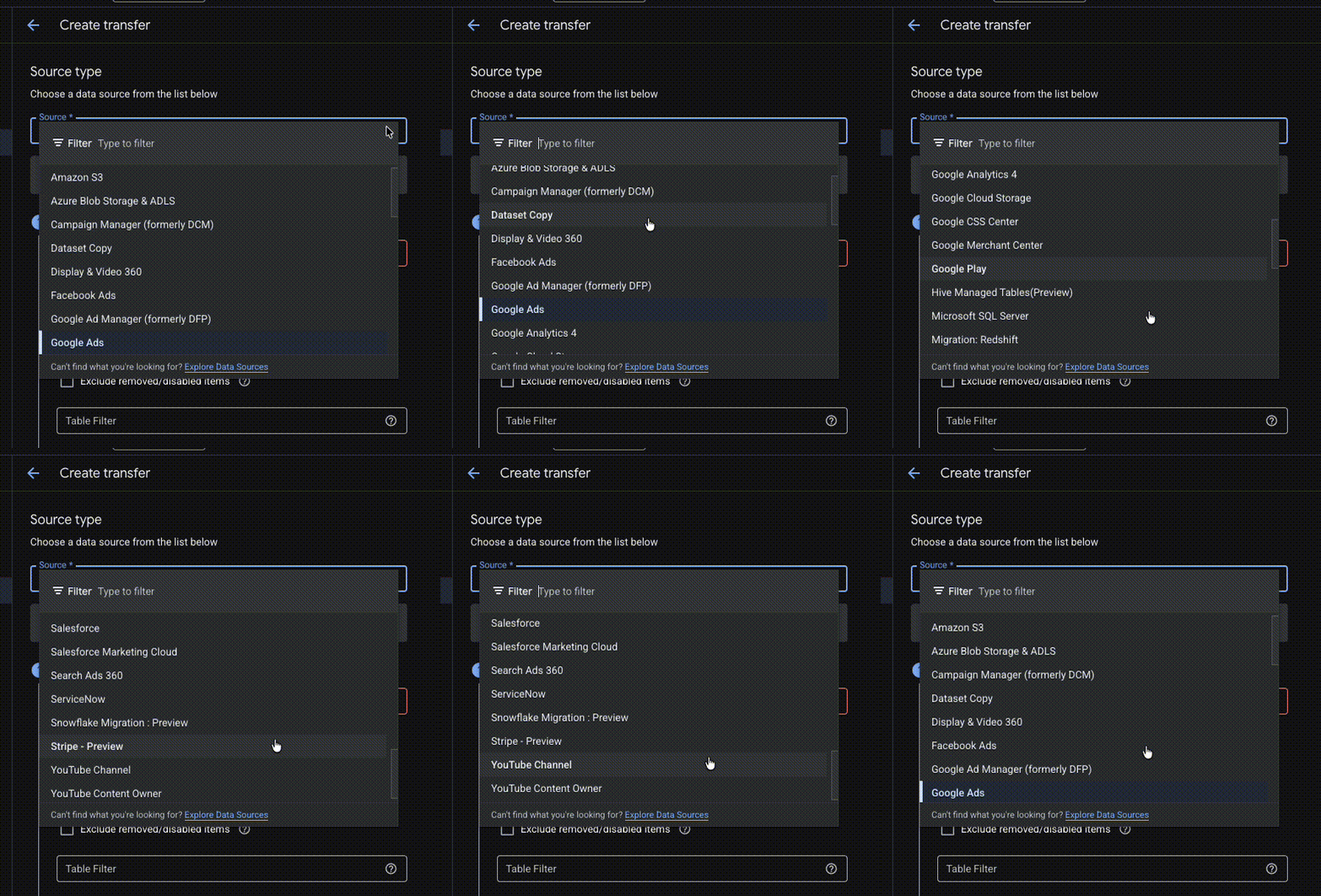
Until recently, the native Facebook connector was fairly limited. It retrieved a large volume of data with almost no effort, but gave you no control over its structure. It also downloaded all data linked to an account, which was a problem when the account contained several clients and we needed data for only some of them. The API token also required repeated reauthorization, often tempting people to use a long-lived token—hardly ideal from a security perspective.
The situation has improved significantly in recent months. The new connector lets us choose which tables, metrics, and dimensions to download, although the selection remains limited. More significantly, it lets us restrict downloads to the accounts the token can actually access. The token still needs regular renewal, which is standard for the Facebook API.
Keboola
When a platform has no GCP connector of its own, or the native approach doesn't meet our needs, Keboola is one of the most widely used alternatives. It offers a convenient environment that resembles native connectors in many ways, while providing more flexibility and control over data loading. The tradeoffs are its price and the addition of another tool that needs attention in our technology stack.
Check Keboola's current pricing when estimating costs, since plans and allowances can change. Include both extracting data into Keboola and loading it into BigQuery in your pipeline estimate.
In return, Keboola offers a wide range of connectors that aren't commonly available in GCP. It covers most marketing and e-commerce platforms, including Bing, Sklik, TikTok, Pinterest, LinkedIn, Heureka (a Czech comparison-shopping platform), Shoptet, and Shopify. Each connector behaves a little differently, especially in its authorization and handling of date ranges, but Keboola usually provides clear documentation.
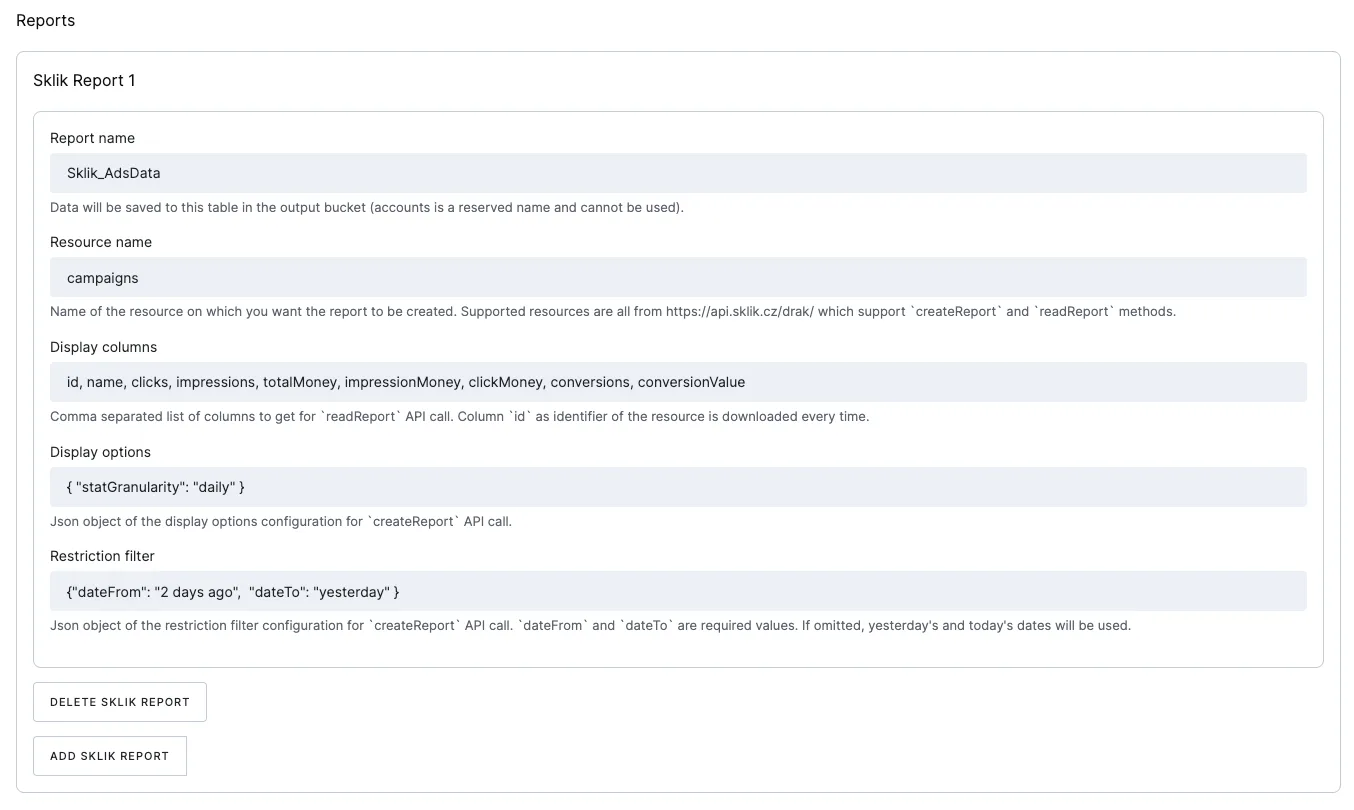
A major advantage is ongoing connector maintenance. Keboola actively updates its connectors, so API changes usually require no intervention from us. It also supports incremental loading directly into BigQuery, significantly reducing redundant data and making pipelines easier to manage.
💡 Keboola is one of several connector platforms. We can also recommend Airbyte, for example, which stands out for its strong open-source support and focuses primarily on extract-and-load connectors. Keboola, by contrast, offers a broader solution for orchestrating an entire pipeline, which may be more than many use cases need.
Cloud Functions
Keboola isn't for everyone. It can be more expensive, adds another tool to the technology stack, and doesn't always offer the control we need. If you don't mind writing a few lines of code and want to stay within GCP, Cloud Functions are an elegant solution.
Their fundamental advantage is that they are part of GCP. Function runs are billed alongside other cloud services, and in practice the cost is very low. For the small daily workloads described here, our clients' daily downloads from ad systems cost from a few Czech koruna (CZK) to a few dozen CZK per month.

At the same time, Cloud Functions give us full control over how we fetch and process data. We typically use Python to specify the source, the query to send, how to validate the data, and where to store it. That freedom comes with higher maintenance demands: you have to monitor API versions, changes in response formats, and the limitations of individual endpoints.
The choice of data sources is broad. Most platforms now provide a REST API for direct downloads. We can also work with XML sources such as product feeds or exchange rates from the Czech National Bank. If a client has its own database, we can connect to that directly; all we need is database-user access and a suitable connector.
Cloud Functions aren't limited to downloading data. They can power complete automation workflows, manage alerts and send notifications to project tools or email, run regular data-quality checks, or serve other parts of the pipeline. Their flexibility is why they appear in practically every modern GCP data stack.
What we prefer at igloo 🐧
Having covered several ways to get data into BigQuery, it is natural to ask which is best. The answer is simple: none of them. Every approach has strengths and weaknesses, and the right choice makes sense only in context. The goal is to choose the option that best matches what we want to achieve, not to search for a universal solution.
Google's own tools make the choice simplest. Connections to GA4, Google Ads, and Search Console are stable, fast, and meet practically all our needs for a data feed. If a native connector exists, we use it almost without hesitation. With minimal effort, we get highly granular data and little ongoing maintenance. It is convenient, functional, and above all, reliable.
For other sources, we have to weigh maintenance, price, and how technically open the ecosystem is. Keboola makes sense when convenience and predictable costs are the priority. Its connectors are stable, take most of the work off our hands, and usually need little attention after the initial setup. The downsides are the price and another tool to track in the technology stack. If Keboola is already in place, the choice is easy. If it isn't, the decision comes down to balancing convenience and cost.
Cloud Functions sit at the other end of the spectrum. They are inexpensive, flexible, and give us complete control over how we retrieve, validate, and store data. Running costs are negligible, and everything behaves consistently within GCP. But they require a certain level of technical maturity: you have to monitor API versions, respond to changes in data structures, and deal with unexpected connector failures. That sometimes means extra work, but it is often the very work that lets us tailor the solution to the client's exact needs.
So which approach do we prefer at igloonet? First, we use everything Google offers natively. If a client uses Keboola, we're happy to build on it. In other situations, we choose Cloud Functions because they let us respond quickly, retain full control over the data pipeline, and avoid the limitations of external connectors. Whether Cloud Functions make sense also depends on how “mainstream” the source is. If most clients use an ad platform or database, its connection and ongoing maintenance are simpler and less expensive. For more peripheral tools, we usually choose another solution, such as Keboola.
And finally, there is no single right path—only the one that best supports the specific goal of your work with data.
This article was translated from the Czech original on the igloonet blog.